
Holspin login opens from the Login button in the account panel on the home page. The form has two fields: mobile number or username, and a password of 6 to 20 characters. The mobile number goes in international format without the plus sign, starting with 61, for example 61480050689. If the password is lost, the Forgot Password link under the form starts recovery through the registered mobile number. If the number is no longer active, Live Chat in the bottom menu restores access.
Most Holspin sign-in problems have a quick fix. The table matches each common situation to the action that solves it.
| Situation | What to do |
|---|---|
| Forgot password | Forgot Password link under the login form |
| "Wrong number" error | Enter the number as 61XXXXXXXXX, without the leading 0 or the + sign |
| SMS code not received | Wait 1-2 minutes, check signal and blocked senders, then request again |
| Password rejected at sign-up | Use 6 to 20 characters |
| Account blocked or frozen | Live Chat, with the registered number and full name |
| Site doesn't open or looks different | Check the domain against a saved bookmark before entering details |
Typing the number in the wrong format causes more failed logins than any other single mistake.
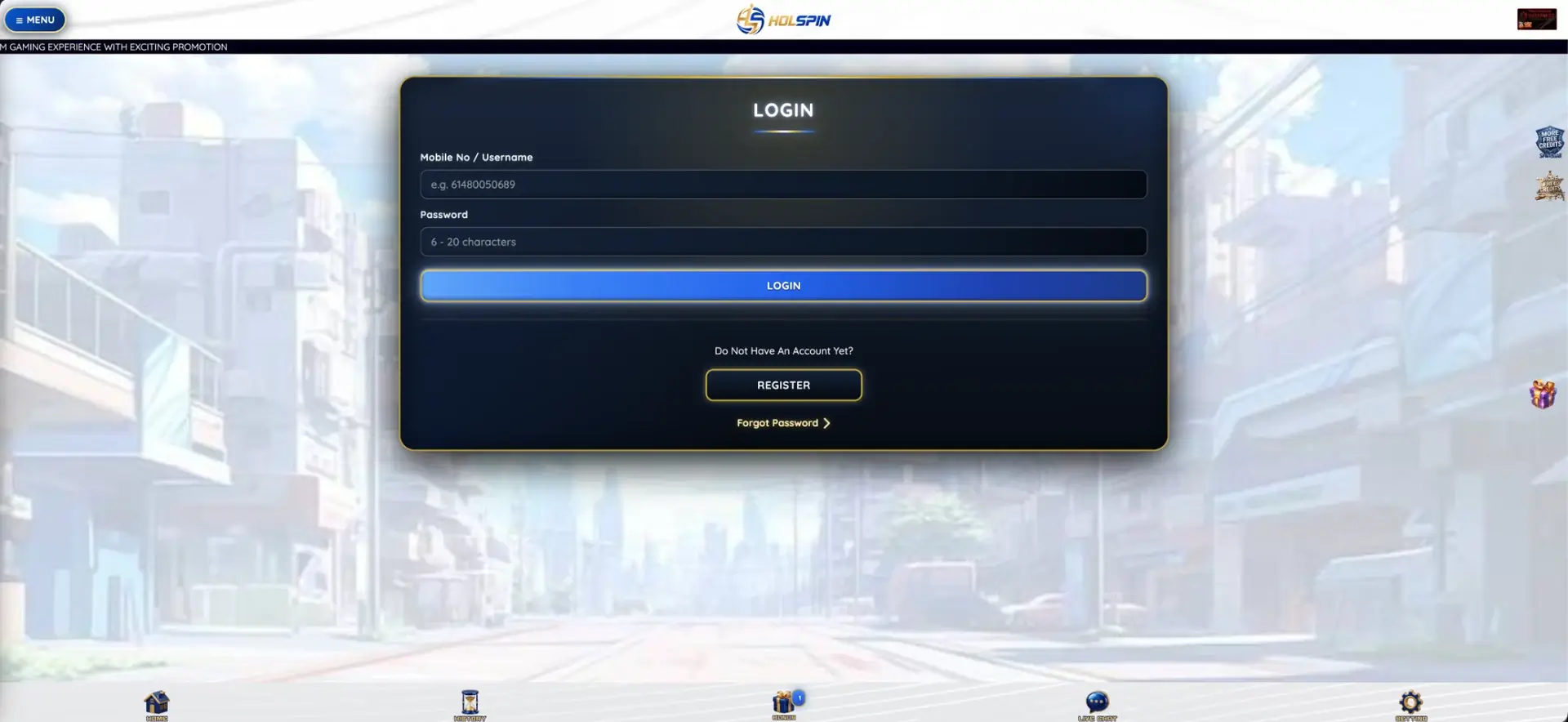
Holspin login on desktop
On a computer, the account panel sits in the right-hand column of the home page, next to the balance and the Deposit and Withdraw buttons. Signing in takes five steps:
- Open the official Holspin domain from a saved bookmark.
- Click Login in the account panel.
- Enter the mobile number in 61 format, or the username, in the first field.
- Enter the password (6 to 20 characters).
- Click the blue Login button. The panel then shows the balance in AUD.
After signing in, the panel shows the balance along with the minimum deposit (AUD 10) and minimum withdrawal (AUD 50).
Holspin login on a smartphone
The mobile version uses the same form with the same two fields, in the phone's browser. Nothing has to be installed:
- Open the Holspin domain in Chrome, Safari or another mobile browser.
- Tap Login in the account panel.
- Enter the mobile number or username and the password.
- Tap Login.
- Optionally, add the page to the home screen for one-tap access next time.
Once signed in, the bottom bar gives direct access to Home, History, Bonus, Live Chat and Setting.
Restoring access to a Holspin account
Access is tied to the mobile number confirmed by SMS at registration. As long as that number is active, recovery stays in the player's hands:
- Open the login form and tap Forgot Password under the Register button.
- Enter the registered mobile number in 61 format.
- Follow the prompt to confirm the request through the number.
- Set a new password of 6 to 20 characters that isn't used on any other site.
- Sign in with the new password and check that the balance and History tab look right.
If the number has changed, the reset prompt can't reach the player. In that case Live Chat handles recovery. It helps to have the old number, the full name exactly as registered, and the date and amount of the last deposit.
Why the Holspin login fails
A failed sign-in almost always has one of four causes. Each is easy to check in under a minute.
Number entered in the wrong format
Australian mobile numbers are usually written with a leading 0, but the Holspin form expects the international format. Typical errors:
- 0480 050 689 instead of 61480050689.
- +61 480 050 689 with a plus sign and spaces.
- 61 0480 050 689, with both the country code and the 0.
Password typed incorrectly
Passwords are case-sensitive and limited to 6-20 characters. Common causes:
- Caps Lock switched on.
- The phone's keyboard adding an automatic capital at the start.
- A saved password from before a reset being filled in by the browser.
Wrong or copied domain
Casino-style sites in Australia are often blocked by internet providers at the request of the regulator, and lookalike domains appear in their place. Warning signs:
- A slightly different spelling of the name in the address bar.
- A login page with no account panel or balance area.
- A link from an unexpected message or ad rather than from a bookmark.
Account restricted
An account can be put on hold during checks. The login then fails even with the right details. Typical reasons:
- A second account registered by the same person.
- A name mismatch found during a withdrawal check.
- A closure or limit requested by the player earlier.
Protecting the Holspin account
A Holspin account holds real money in AUD and is opened with a password of as few as 6 characters. Small habits make a large difference:
- Open the site only through a saved bookmark of the official domain.
- Use a unique password close to the 20-character limit, mixing letters and numbers.
- Keep the registered mobile number active. It's the main route to recovery.
- Never share SMS codes with anyone, including people claiming to be support.
- Log out on shared computers and don't let the browser save the password there.
Holspin support doesn't need a password to help with an account. Any request for one is a warning sign.
One person, one account
When a password is lost, opening a fresh account can look quicker than recovering the old one. It creates more problems than it solves. The AUD 19 New Member Free Gift and other one-time offers are limited to one per person, and two accounts with the same name or bank details are usually flagged at the first withdrawal. Both balances can then be frozen while the operator investigates. Recovering the original account keeps the balance, the bonus history and the History tab records in one place.
Inside the Holspin account
After login, everything to do with money is reached from the account panel and the bottom menu. The table shows where each function sits.
| Section | What it shows or does |
|---|---|
| Balance | Current funds in AUD |
| Deposit | Opens the cashier to add funds, from AUD 10 |
| Withdraw | Opens the payout form, from AUD 50 |
| Refresh | Updates the balance after leaving a game |
| History | Record of deposits, withdrawals and their status |
| Bonus | All offers with Claim buttons, including free credits and rebates |
| Live Chat | Support conversation |
| Setting | Account settings |
Checking the History tab after each session takes seconds and keeps weekly spending visible.
When verification is requested
At registration, Holspin asks for the full name exactly as it appears on the player's bank account, and payouts go to that account. Before the first withdrawal, or after an unusual one, support may ask for proof that the name and the bank account belong to the same person. Clear photos of a driver licence or passport, with all four corners visible, plus a bank statement showing the same name, usually settle it. Sending readable files on the first attempt avoids a second round of requests.
Questions and answers
These are the most common questions about signing in to Holspin and keeping access to the account.
Holspin login: username or phone number?
Either one works. The first field accepts both the username and the mobile number in 61 format, for example 61480050689.
How long can a Holspin password be?
Between 6 and 20 characters. A longer password close to the limit is harder to guess.
Why does the Holspin login reject a mobile number?
The format. Remove the leading 0 and any + sign or spaces, then start with 61.
How to reset a forgotten Holspin password?
Tap Forgot Password under the login form and confirm the request through the registered mobile number. If that number no longer works, contact Live Chat.
Can a new account replace a lost one?
No. One account per person is allowed. A second account risks both balances being frozen at the first withdrawal.
Is the Holspin login different on mobile?
No. The mobile browser version uses the same two fields and the same account, balance and cashier as the desktop site.
Updated 22 October 2026.