
Holspin doesn't offer a downloadable app. The full site runs in the mobile browser on Android and iOS, with the same account, AUD balance and cashier as on a computer. Deposits start at AUD 10, withdrawals at AUD 50, and every offer in the Bonus tab, including the AUD 19 New Member Free Gift, can be claimed from a phone. Adding a home screen shortcut gives one-tap access that works like an app icon.
The mobile version is a responsive layout of the same site, not a reduced version of it. The table compares the main functions on desktop and on a phone.
| Function | Desktop | Mobile browser |
|---|---|---|
| Login | Number or username + password | Same |
| Balance and Refresh | Right-hand account panel | Account panel, stacked layout |
| Deposit / Withdraw | From AUD 10 / from AUD 50 | Same limits |
| Bonus tab | All offers | All offers |
| Pokies, live, fish, card, crash | Full catalogue, 35+ studios | Full catalogue |
| Sport | Available | Available |
| Navigation | Menu + bottom bar | Bottom bar: Home, History, Bonus, Live Chat, Setting |
The bottom bar is the main difference in daily use. It keeps History, Bonus and Live Chat within thumb reach on any phone.
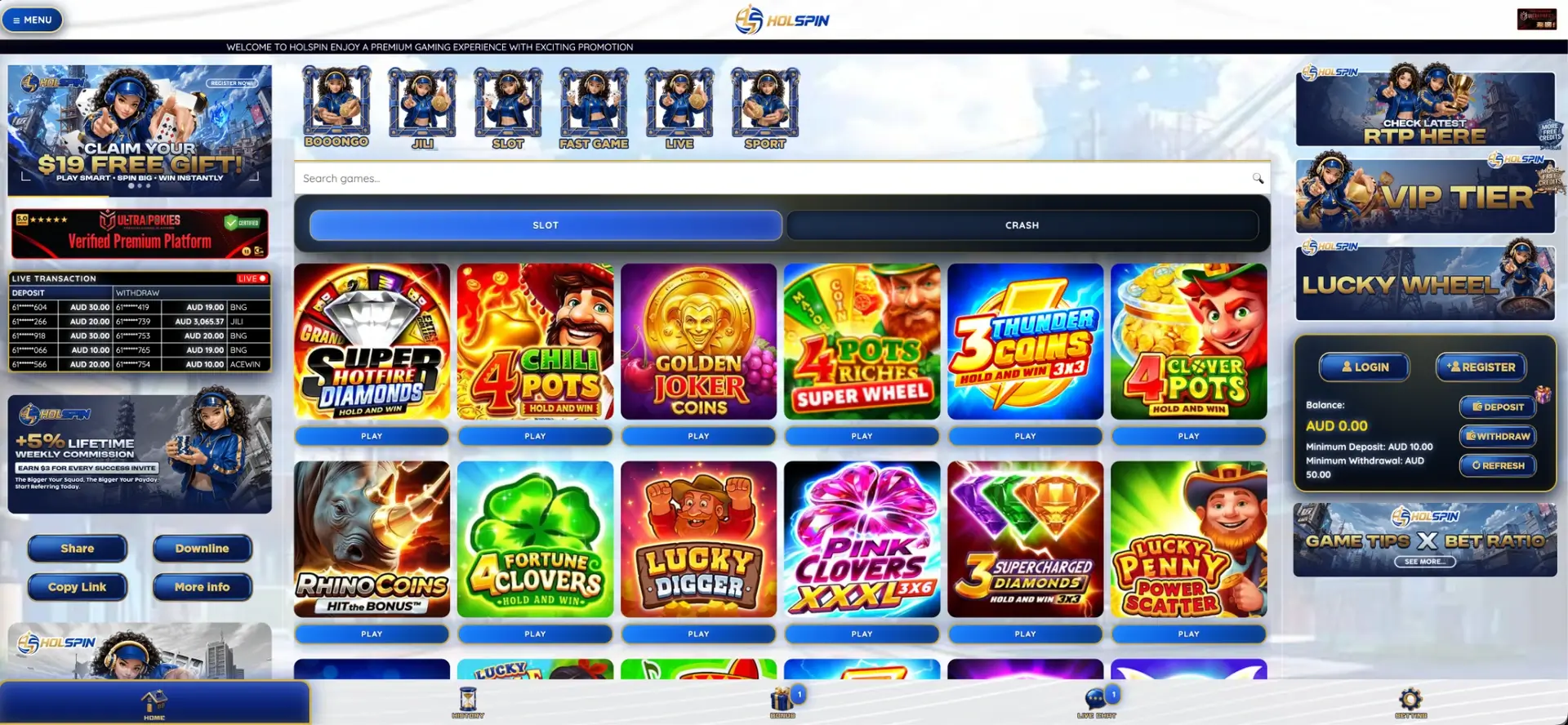
Holspin app: current status
The Holspin navigation has no download section, and the site is designed to be used directly in the browser. That means no installation file, no storage space used by an app, and no separate updates: changes to the site appear automatically on every device.
Pages offering a "Holspin APK" or an app from an unknown source aren't connected to the official site. Installing such a file gives a stranger's code access to the phone and to any login details typed into it.
Opening Holspin on a phone
Getting from a closed phone to a signed-in account takes about a minute the first time:
- Open Chrome on Android or Safari on iPhone.
- Enter the official Holspin domain or open a saved bookmark.
- Tap Login in the account panel, or Register for a new account.
- Enter the mobile number in 61 format (for example 61480050689) and the password.
- Check the balance in AUD and tap Refresh if it doesn't update.
New accounts need an SMS verification code during registration, so the phone used for sign-up should have signal at that moment.
Shortcut on the home screen
A shortcut gives the Holspin site its own icon on the phone, so it opens straight from the home screen without typing the address. The steps differ slightly between systems.
iPhone and iPad
On iOS the shortcut is created from Safari:
- Open the Holspin site in Safari.
- Tap the Share icon at the bottom of the browser.
- Choose Add to Home Screen.
- Keep or edit the name and tap Add.
Android
On Android the shortcut is created from Chrome:
- Open the Holspin site in Chrome.
- Tap the three-dot menu in the top-right corner.
- Choose Add to Home screen.
- Confirm the name and tap Add.
The icon always opens the address it was created from, which also protects against mistyped or copied domains.
Holspin mobile cashier
The cashier on a phone opens from the same Deposit and Withdraw buttons as on desktop, with the same limits. The table lists the fixed rules that apply on every device.
| Rule | Value on mobile |
|---|---|
| Minimum deposit | AUD 10 |
| Minimum withdrawal | AUD 50 |
| Currency | AUD |
| Payout account | Bank account in the name used at registration |
| Transaction record | History tab in the bottom bar |
The cashier lists the available methods with their processing times and maximum amounts. If a deposit is made through a banking app on the same phone, switching between the two apps is common. Wait until the payment is confirmed in the banking app before returning and tapping Refresh.
Data and connection
Different parts of Holspin load very different amounts of data. That matters on a mobile plan or on a weak signal.
| Section | Connection needed | Note |
|---|---|---|
| Pokies | Light after loading | Most data is used when the game first opens |
| Fish and crash games | Moderate, steady | Rounds run in real time, so drops can interrupt play |
| Live dealer tables | Heavy | Continuous video, better on Wi-Fi |
| Sport, in-play | Moderate, steady | Odds update constantly |
| Bonus tab and cashier | Light | Text and buttons only |
If a connection drops in the middle of a pokies round, the result is still settled by the game provider. Tapping Refresh after reconnecting shows the correct balance.
Sending verification documents from the phone
If support asks to confirm that the account name matches the bank account, a phone camera is all that's needed. The photos are accepted on the first attempt when they meet a few simple conditions:
- The whole document is in the frame, with all four corners visible.
- The text is sharp and readable, without glare from a flash or lamp.
- The document is valid, not expired.
- The name matches the name given at registration, letter for letter.
- A bank statement, if requested, shows the same name and the account used for payouts.
Documents are sent through the channel support specifies, usually Live Chat. They should never go to an address or number that contacted the player first.
Mobile security
A phone is both the device for playing and the key to the account, because the registered mobile number receives the SMS codes. Basic precautions:
- Keep a screen lock on the phone, so a lost device doesn't mean a lost account.
- Open Holspin only from the home screen shortcut or a bookmark.
- Don't install APK files claiming to be a Holspin app.
- Avoid signing in on public Wi-Fi without a trusted connection.
- Never forward SMS codes, even to someone claiming to be support.
If the phone is lost, contacting Live Chat from another device to secure the account comes before replacing the SIM.
Questions and answers
The questions below cover the Holspin mobile site and what to expect from it on Android and iPhone.
Is there a Holspin app to download?
No. Holspin runs in the mobile browser. A home screen shortcut gives the same one-tap access as an app icon.
Does the Holspin app version have the same bonuses?
Yes. The Bonus tab on mobile lists the same offers, including the AUD 19 free gift, the 20% and 30% deposit bonuses and the 5% weekly cashback.
Do deposits and withdrawals work on a phone?
Yes. The mobile cashier has the same AUD 10 minimum deposit and AUD 50 minimum withdrawal as the desktop site.
Do live dealer tables work on mobile?
Yes. Live tables are available in the browser and run best on Wi-Fi, because the video stream uses the most data.
Is it safe to install a Holspin APK from another site?
No. Holspin doesn't distribute an app file, so any APK carrying the name comes from an unrelated source.
Why does the balance lag after a game on mobile?
Some providers report results with a short delay. Tapping Refresh in the account panel updates the balance.
Updated 22 October 2026.